
That split second after your phone takes an unexpected dip is pure panic how to get water out of a charging port Maybe it slipped into the sink. Maybe rain caught you off guard. Or maybe—worst case—it went straight into the toilet. You dry the screen, press the power button, and then notice the alert: liquid detected in charging port.
If you’re here, you’re trying to figure out how to get water out of a charging port safely and quickly. Good news—you’re already doing the right thing by not plugging it in and hoping for the best. This guide walks you through what actually works, what to avoid, and how to protect your phone (especially if it’s an iPhone) from long-term damage.
Why Water in the Charging Port Is a Big Deal
Your charging port is packed with tiny metal contacts. Water sitting inside can cause corrosion, short circuits, or charging issues that show up days later.
Modern phones—especially iPhones—have built-in liquid detection. That’s helpful, but it doesn’t remove the water for you. It just stops charging to protect the phone. Knowing how to get water out of charging port iPhone models (and Androids too) can save you a costly repair.
First Things First: What NOT to Do
Before we get into fixes, let’s clear up the biggest mistakes people make.
Avoid These Common Errors
-
Don’t plug in the charger to “test it”
-
Don’t use a hair dryer or heat gun
-
Don’t stick paper clips, cotton swabs, or needles inside
-
Don’t shake violently (this pushes water deeper)
Heat and metal tools can permanently damage internal components. Gentle and patient wins here.
How to Get Water Out of Charging Port Fast (Safe Methods)
If speed matters—and it usually does—start with these phone-safe techniques.
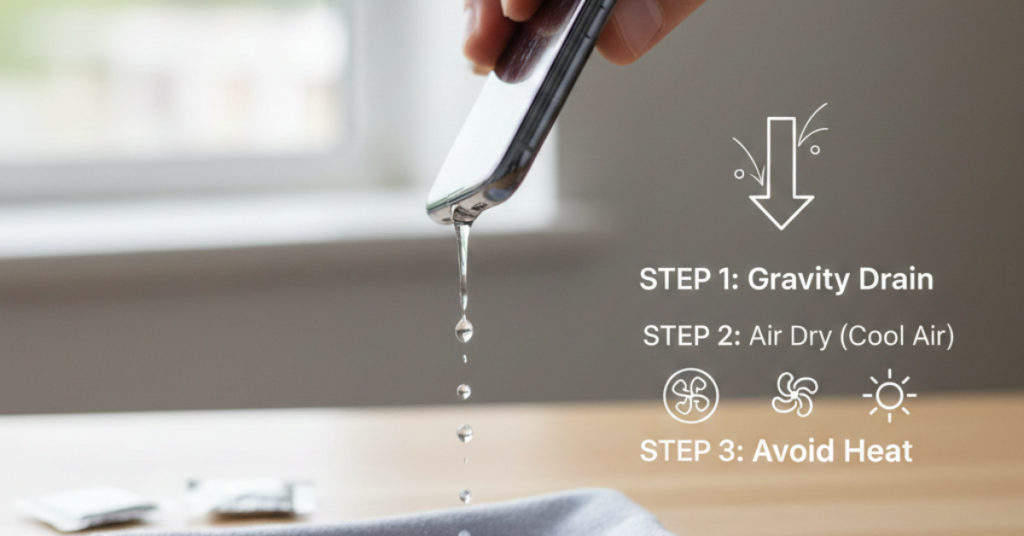
1. Power Off and Let Gravity Help
This sounds basic, but it works.
Steps:
-
Turn the phone off completely
-
Hold it with the charging port facing down
-
Gently tap the phone against your palm
This encourages water to drip out naturally without forcing it further inside.
2. Use Air—But Only the Right Way
Compressed air can help if used carefully.
How to do it safely:
-
Use short, gentle bursts
-
Keep the nozzle several inches away
-
Aim across the port, not directly into it
This method is effective if you’re trying how to get water out of charging port fast, especially right after exposure.
How to Get Water Out of Charging Port on iPhone (Apple-Approved Approach)
Apple doesn’t recommend hacks like rice or heat. Their advice focuses on time, airflow, and patience.
Apple’s Suggested Steps
-
Unplug all accessories
-
Place the iPhone in a dry area with airflow
-
Let it sit for at least 30 minutes, ideally longer
-
If the alert persists, wait up to 24 hours
Some iPhones (Apple Watch especially) use sound vibrations to eject water, but iPhones do not officially support this feature—despite what some apps claim.
The Rice Myth: Does It Actually Work?
Short answer: not really.
Rice doesn’t pull moisture out of enclosed spaces effectively. It’s slow and can leave dust behind. Better alternatives exist.
Better Drying Options
-
Silica gel packets (from shoe boxes or electronics)
-
A dry room with a fan
-
Open-air placement near (not on) a dehumidifier
If you’re serious about how to get water out of charging port iphone, skip the rice.
Step-by-Step: The Best All-Around Method
If you want a simple, reliable plan, follow this order:
-
Power off the phone
-
Remove the case
-
Gently tap port-side down
-
Use gentle airflow
-
Place in a dry, ventilated area
-
Wait several hours before charging
Most charging port moisture issues resolve within 12–24 hours using this approach.
How Long Should You Wait Before Charging?
This depends on how much water got in.
General Guidelines
-
Light splash: 30–60 minutes
-
Heavy exposure: 12–24 hours
-
Submersion: 24–48 hours
If your phone still shows a moisture warning, listen to it. Forcing a charge can cause permanent damage.
Signs Water Is Still in the Charging Port
Watch for these red flags:
-
“Liquid detected” alert won’t go away
-
Charging starts and stops
-
Phone gets warm while charging
-
Corrosion or discoloration inside the port
If these continue after 48 hours, professional service may be needed.
FAQs About Water in Charging Ports
Can I use a vacuum to remove water?
A gentle vacuum from a distance may help, but strong suction can damage internal parts. Use with caution.
Does rubbing alcohol help?
Not recommended. It can damage seals and coatings inside the phone.
Will water permanently damage my phone?
Not always. Quick, correct action dramatically improves survival odds.
Is wireless charging safe while the port is wet?
Usually yes, once the phone is fully dry externally—but check manufacturer guidance first.
Final Thoughts: Slow Down and Do It Right
Water in your charging port feels urgent—and it is—but rushing the wrong fix causes more harm than good. Knowing how to get water out of charging port safely gives your phone the best chance of recovery.
Be patient. Use airflow, not heat. Trust the moisture warnings. And if this happens often, consider a waterproof case or wireless charging as a backup.